If some of your visitors write in Arabic, your Arabic chatbot needs more than good translations. Arabic is written right to left, often mixed with English names and numbers, and it needs fonts that stay readable at small sizes. This checklist covers what to look at before launch, whether your site is in Arabic, English, or both.
Why Arabic needs its own checks
Most chat widgets are designed left to right first. When an Arabic message appears in a left to right layout, punctuation can jump to the wrong end, bubbles can align oddly, and mixed text can become hard to follow. None of this is about the quality of the answer. It is about whether the visitor can read it comfortably.
Arabic speaking visitors also tend to mix scripts naturally: an English brand name inside an Arabic sentence, a phone number, a price with a currency code. A good Arabic chatbot handles all of that without breaking the line.
Talkwyn detects the language of each message, replies in the same language, and displays Arabic right to left with readable fonts. The checks below help you confirm that on your own site, with your own content.
Right to left layout
Open your chat and send a few Arabic messages. Check that:
- Arabic text starts on the right and reads right to left.
- Question marks and periods appear at the end of the sentence, on the left side.
- The chat bubbles line up in a way that feels natural to an Arabic reader.
- English replies in the same chat still display left to right.
- Source links under each answer stay readable and clickable.
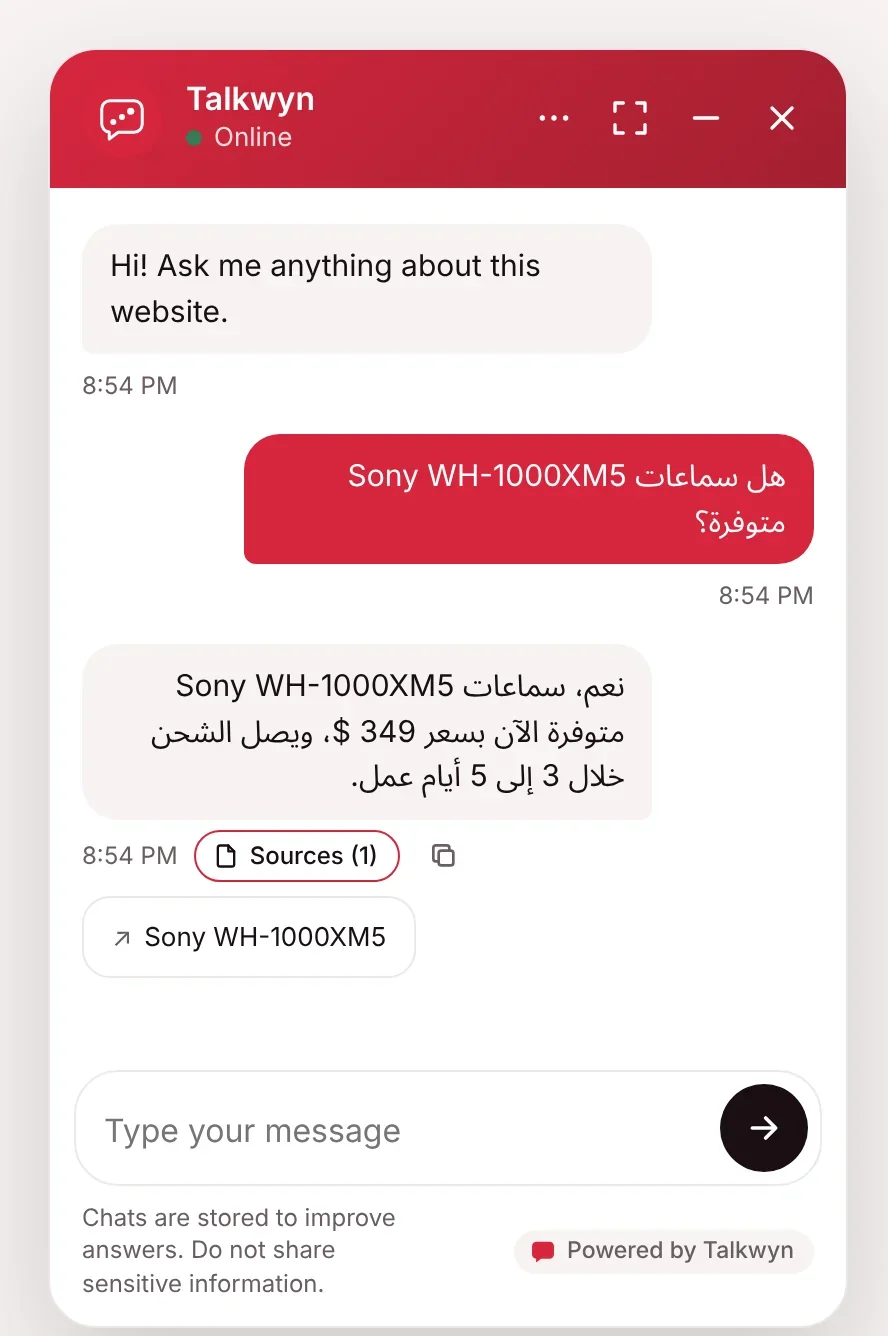
Mixed Arabic and English text
Mixed text is normal, not an edge case. Test messages like these:
- An Arabic question that includes an English product or brand name.
- A message that starts in Arabic and switches to English halfway through.
- An Arabic question that includes an email address or website.
- A follow-up in English after an Arabic answer.
Talkwyn keeps names, prices, emails, and product names exactly as written, and it handles messages that switch language mid-sentence. If the visitor switches to English for the next message, the chatbot switches too.
Numbers, prices, and dates
Numbers deserve their own test because mistakes here cost money or bookings.
- Prices. Ask for the price of a few products in Arabic. The amount and currency should match your page exactly.
- Phone numbers. Check that phone numbers keep their digits in the correct order inside an Arabic sentence.
- Opening hours and dates. Ask about hours and holiday dates and make sure they read clearly.
- Digits. Arabic speakers may write with Western digits (1, 2, 3) or Eastern Arabic digits. Try both in your questions to see that the chatbot understands them.
Because prices are kept as written on your site, the most important step is making sure your pages have correct, current prices with a clear currency. Our guide on writing pages your chatbot can answer covers pricing pages in detail.
Fonts and readability
Arabic letters connect and change shape depending on their position in a word. A font that looks fine for English can make Arabic small, thin, or cramped. Check on both a phone and a laptop:
- Arabic text is large enough to read without zooming.
- Letters connect properly and do not look broken.
- Line spacing leaves room for dots and marks above and below letters.
- Your theme’s font choices do not override the chat window in a way that hurts Arabic.
Talkwyn displays Arabic with readable fonts by default. If your theme applies strong custom styles everywhere, take a quick look to make sure the chat still looks right.
Test with real Arabic questions
The best test is a native Arabic speaker using your site the way a customer would. Ask them to:
- Ask five to ten common questions about your business, in their own words.
- Try at least one question with an English name or a price in it.
- Ask something your site does not cover, and check the chatbot admits it does not know.
- Try a request like “can I book?” to see the lead form flow in Arabic.
- Read each answer and tell you if it sounds natural and matches your pages.
Arabic has many regional dialects, and visitors may write in a dialect rather than formal Arabic. Include a few dialect questions in your test if your customers use them. Language quality depends on the AI model you choose, so if Arabic is important to your business, compare a couple of models. Our full chatbot test plan covers the rest of the launch checks.
Interface text and the rest of your site
The chatbot’s replies follow the visitor’s language automatically. Interface text, such as the welcome message and button labels, is a separate setting. If you run a translated site with WPML or Polylang, you can translate Talkwyn’s interface text with those plugins, so Arabic pages show an Arabic welcome message.
If your site is not translated into Arabic, the chatbot can still answer Arabic questions from your existing pages. See the Arabic chatbot page for example conversations, and the multilingual chatbot overview for the other languages Talkwyn focuses on. Talkwyn is live today as a WordPress chatbot plugin, and multilingual answers are part of the free plan.
Arabic chatbot FAQ
Does Talkwyn display Arabic right to left?
Yes. Arabic displays right to left with readable fonts, while English replies in the same chat stay left to right.
Do I need an Arabic version of my website?
No. Talkwyn can answer Arabic questions from pages written in another language. You may still want Arabic pages for search or legal text.
Will prices and product names be translated?
No. Names, prices, emails, and product names stay exactly as written on your site.
What about messages that mix Arabic and English?
Talkwyn handles messages that switch language mid-sentence and switches its reply language when the visitor does.
How good is the Arabic quality?
It depends on the AI model you choose. Test with a native speaker before launch, including a few dialect questions if your customers use them.
How long does setup take?
About five minutes. Install Talkwyn, paste a free AI key, click Scan my site, pick your color, avatar and welcome message, and turn it on. The setup guide walks through each step.
How does the free trial work?
You get every Pro feature for 15 days on one site. No credit card needed. When the trial ends, upgrade with the same key or keep the free plan. Start the trial.
What happens when the answer is not on my site?
Talkwyn says it could not find that and offers to have your team follow up. It answers business questions only from your own content, so it never invents a price or a policy.
Where are chats and leads stored?
In your own website database. Messages go only to the AI provider you picked, and you can turn chat logs off or have them deleted after a number of days you choose. Read our privacy approach.
Do I need to pay for AI?
Not to get started. Groq, Google Gemini, OpenRouter and Cloudflare Workers AI offer free tiers. Add more than one and Talkwyn switches automatically when one hits its limit. Pro adds OpenAI, Anthropic Claude, Mistral and DeepSeek. Choose an AI provider.