A Groq API key is one of the easiest ways to give your website chatbot a brain without paying for AI. This guide shows you how to get a Groq API key, plus free keys from Google Gemini, OpenRouter, and Cloudflare, and how to plug them into the WordPress chatbot plugin Talkwyn so your chatbot keeps answering even when one provider is busy.
Facts and prices checked October 2026. Verify on each vendor’s page before you decide.
What an AI API key is (in plain words)
An API key is a long string of letters and numbers that works like a password for software. When your chatbot needs to write an answer, it sends the visitor’s question to an AI provider. The key tells the provider who is asking, which account the request belongs to, and how much that account is allowed to use.
You do not need to be a developer to use one. You create the key on the provider’s website, copy it, and paste it into your chatbot’s settings. That’s it. The chatbot does the rest.
Two things are worth knowing from day one:
- A key is tied to your account. Anyone who has it can use your quota, so treat it like a password.
- Each provider sets its own rules. How many requests you can send, which models you can use, and what is free are all decided by the provider, not by your chatbot.
How to get a Groq API key, step by step
Groq runs open AI models and is known for fast replies, which suits a chat window where visitors expect an answer in seconds. Getting a Groq API key takes a couple of minutes. Need a plugin to use the key with? See the best WordPress chatbot plugins.
- Go to console.groq.com/keys and sign in or create an account.
- On the API keys page, choose to create a new key.
- Give it a name you will recognize later, like “My website chatbot”.
- Copy the key right away. It is shown only once. If you lose it, delete it and create a new one.
- Paste the key into your chatbot’s AI provider settings and save.
Other free AI API key options
A Groq API key is a great start, but it should not be your only one. Here are three more providers that offer free tiers, with the steps we are sure of. Screens change from time to time, so if a button has moved, look for a page called “API keys” or “Keys”.
Google Gemini (Google AI Studio)
- Go to aistudio.google.com/app/apikey and sign in with a Google account.
- Choose to create an API key.
- Copy the key and store it somewhere safe, like a password manager.
- Paste it into your chatbot as a Gemini provider.
Gemini is a good second choice because it comes from a different company than Groq. If one provider has a busy hour, the other usually does not.
OpenRouter
- Go to openrouter.ai/settings/keys and sign in or create an account.
- Create a new key and give it a name.
- Copy the key once and keep it safe.
- Paste it into your chatbot as an OpenRouter provider.
OpenRouter gives you one key that reaches models from many companies. Some models are marked as free on OpenRouter. Check which ones are free today before you choose one, because that list changes.
Cloudflare Workers AI
- Sign in to the Cloudflare dashboard.
- Find and copy your Account ID.
- Create an API token that is allowed to use Workers AI.
- Copy the token once and keep it safe.
- Paste both the Account ID and the token into your chatbot as a Cloudflare provider.
Cloudflare needs two values instead of one. That is the only extra step, and it is worth it if you already use Cloudflare for your site.
What “free tier” really means, and why limits change
A free tier is an allowance, not a promise. Each provider lets free accounts send a certain number of requests, or use a certain amount of text, in a given time. Go over it and the provider pauses your requests until the window resets, or asks you to add billing.
We do not list the numbers here, on purpose. Providers change their free limits often, sometimes with little notice, and different models on the same account can have different limits. A number we printed today could be wrong next month. Instead:
- Open each provider’s own limits or pricing page before you choose.
- Check the limits for the exact model you plan to use, not just the account.
- Look again every few months, or when your chatbot starts getting more traffic.
- Assume any free tier can shrink, and plan a backup.
For many small business sites, a free tier is enough for everyday questions. A busy week, a sale, or a mention on social media can push you over. That is why the next two sections matter.
Is there an unlimited free AI API key?
No. Searches for a “free AI API key unlimited” are common, and the honest answer is that no reputable provider offers unlimited AI for free. Running AI models costs real money in hardware and electricity, so every free tier has a ceiling.
Be careful with websites or posts that offer “unlimited” keys. They are often shared keys taken from someone else’s account, which can stop working at any moment, break the provider’s terms, and expose your visitors’ messages to a stranger. Use only keys you create yourself, on the provider’s own website.
The practical way to get close to “never runs out” is to combine several free keys from different providers. Each one has its own allowance, and your chatbot moves to the next one when the first is full.
How to keep your API keys safe
A leaked key can drain your quota or, if you have billing turned on, run up a bill. A few habits keep you safe:
- Paste keys only into your chatbot’s settings. Never put a key in a page, a post, a theme file, or a public code repository.
- One key per site. If one site has a problem, you can turn off that key without touching the others.
- Store keys in a password manager, not in email, chat messages, or a shared document.
- Do not send keys to anyone, including people who say they are support staff. You can always create a fresh key for a trusted developer and delete it later.
- Delete keys you no longer use. Old keys are easy to forget and easy to misuse.
- If you think a key leaked, delete it and create a new one. Then paste the new key into your chatbot.
In Talkwyn, keys are stored in your own WordPress site, and messages go only to the AI provider you picked. Talkwyn does not route your visitors’ messages through anyone else.
Use two keys for automatic fallback in Talkwyn
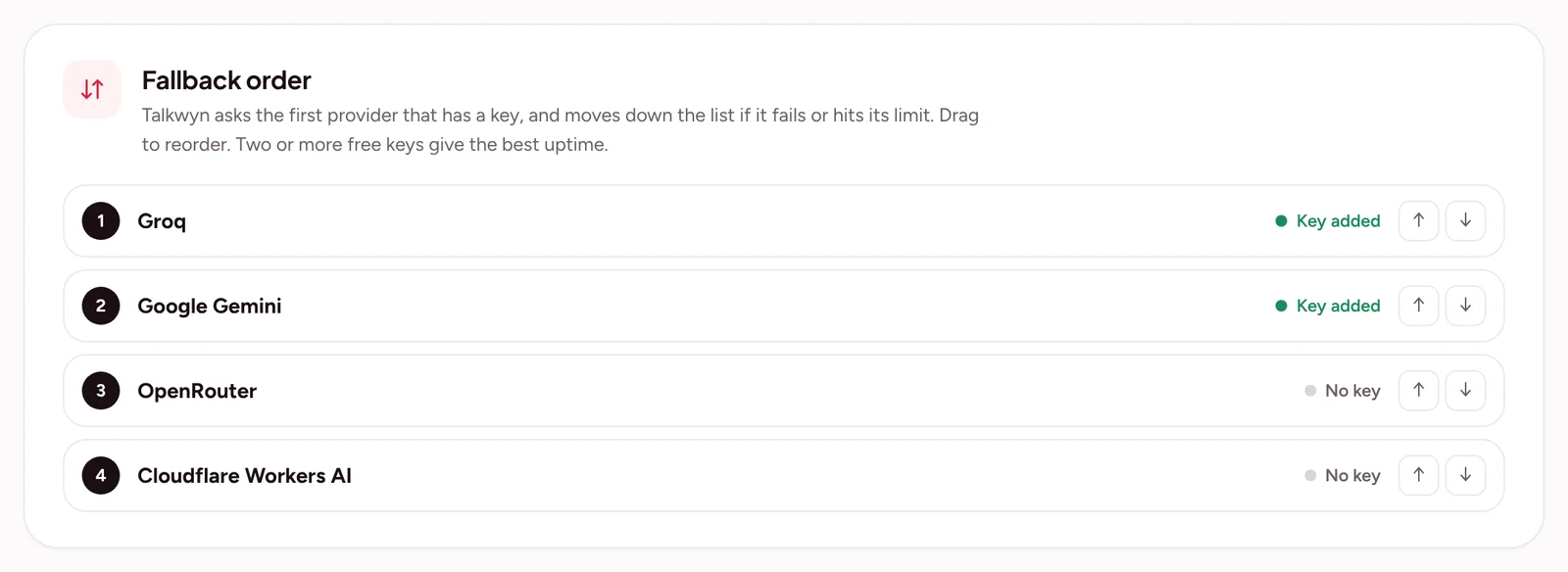
Here is where free keys become reliable. Talkwyn lets you add more than one AI provider. Put your favorite first. When that provider hits its limit or is busy, Talkwyn switches to the next one automatically and remembers which one is working, so visitors do not see an error.
If every provider is busy at the same moment, Talkwyn still replies with the most relevant information it found on your site, so nobody is left staring at a spinner.
- Create a Groq API key and a second key from another provider, such as Google Gemini.
- In your WordPress dashboard, open Talkwyn’s AI provider settings.
- Add Groq and paste its key.
- Add the second provider and paste its key.
- Put the provider you prefer at the top of the list and save.
- Ask your chatbot a question on your site to confirm it answers.
Talkwyn also handles greetings and small talk without calling the AI at all, so “hi” and “thanks” do not use up your free quota. The guide to choosing an AI provider explains the order Talkwyn tries providers in, and what changes with paid models.
If you have not set up a chatbot yet, follow our step-by-step guide on how to add a free AI chatbot to WordPress. It takes about five minutes.
When to move to a paid model
Free keys are a great way to start. You might want a paid model if your site gets a lot of questions every day, if you need the best possible quality in a less common language, or if you want predictable capacity during busy seasons. Language quality depends on the model you choose, so test your main languages either way.
Talkwyn Pro adds OpenAI, Anthropic Claude, Mistral, and DeepSeek. You can try every Pro feature with a free Talkwyn Pro trial for 15 days. No credit card needed. When the trial ends, you can upgrade or keep using the free plan with your free keys.
Groq API key FAQ
Is a Groq API key free?
Creating a Groq API key is free, and Groq offers a free tier for its models. The free tier has limits that Groq sets and can change, so check Groq’s current limits page before you rely on it.
How do I get a Groq API key?
Sign in at console.groq.com/keys, create a new key, give it a name, and copy it right away. It is shown only once.
Is there an unlimited free AI API key?
No. Every honest free tier has limits, because running AI models costs money. The closest you can get is adding keys from several providers so your chatbot switches when one is full.
Which free AI API key should I use for a chatbot?
Start with a Groq API key, then add a second key from Google Gemini, OpenRouter, or Cloudflare as a backup. Using two different companies makes it less likely both are busy at the same time.
Can someone steal my API key from my website?
Not if you keep it in your chatbot’s settings. Talkwyn stores keys in your WordPress site and never prints them in your pages. Never paste a key into page content or a public file.
What happens when my free limit runs out?
The provider pauses requests until the limit resets. In Talkwyn, a second provider takes over automatically, and if every provider is busy it still replies with relevant information from your site.
How do I try this on my own site?
Install the free plan, or start a 15-day Pro trial, and test it with the questions your customers really ask. Install Talkwyn.
How long does setup take?
About five minutes. Install Talkwyn, paste a free AI key, click Scan my site, pick your color, avatar and welcome message, and turn it on. The setup guide walks through each step.
How does the free trial work?
You get every Pro feature for 15 days on one site. No credit card needed. When the trial ends, upgrade with the same key or keep the free plan. Start the trial.
What happens when the answer is not on my site?
Talkwyn says it could not find that and offers to have your team follow up. It answers business questions only from your own content, so it never invents a price or a policy.