A WooCommerce chatbot is only useful if it can answer what shoppers actually ask. Most questions before a purchase fall into a few groups: stock, sizes and options, price, shipping, returns, and payment. This guide covers each group and shows you how to prepare your store so the answers are right.
Why pre-purchase questions matter
A shopper with an unanswered question has three choices: search your site, email you and wait, or leave. On a phone, with a cart open, searching and waiting both feel like work. A quick answer keeps the decision moving.
A WooCommerce chatbot answers those questions from your store’s own data. Talkwyn reads your WooCommerce products, including price, stock status, and attributes, along with your pages, posts, and menus. It shows source links under each answer, so shoppers can tap through to the product or policy.
The questions below come up in almost every kind of store, from clothing to home goods to digital products. For each group you will find typical questions, what your store needs to have in place, and what the chatbot can and cannot do. Use it as a checklist: if a group has no clear answer anywhere on your site, that is the first page to write, whether you add a chatbot or not.
Stock and availability
Typical questions: “Is this in stock?”, “Do you have it in blue?”, “When will it be back?”
- Keep stock status accurate in WooCommerce. The chatbot reads it directly.
- Set up variations for each size or color so availability is clear per option.
- If you restock on a schedule, say so on the product page or a FAQ page.
- If you offer back orders or pre-orders, explain how they work in plain words.
The chatbot will not guess a restock date. If you have not published one, it says it does not know and offers to have your team follow up.
Sizes, options, and fit
Typical questions: “What size should I get?”, “Is this true to size?”, “What material is it?”
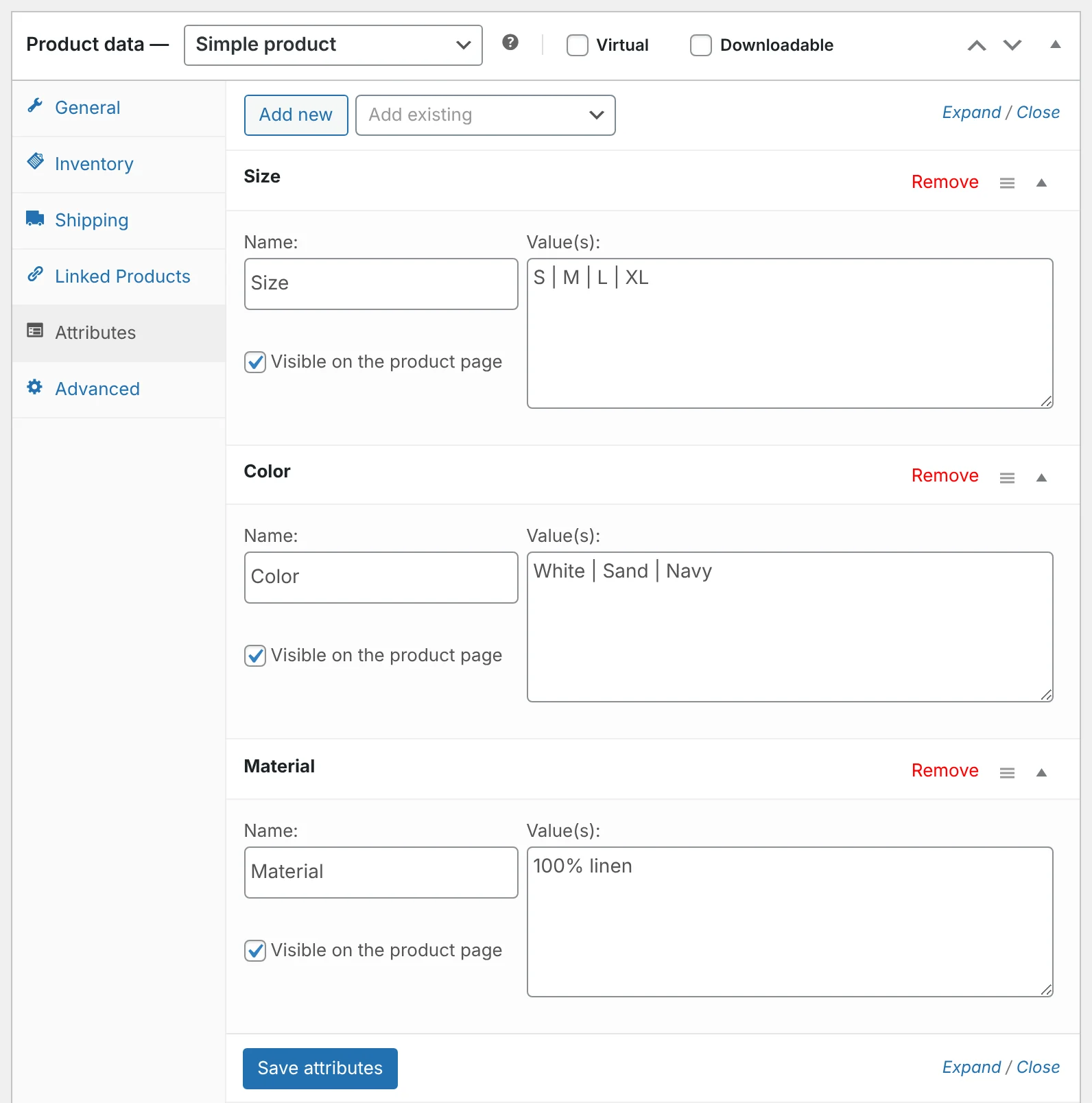
- Fill in product attributes such as size, material, color, and dimensions.
- Publish a size guide as a page, with measurements written as text.
- Add care instructions and materials to product descriptions.
- If items run small or large, say so in the description.
Price, discounts, and payment
Typical questions: “How much is this with shipping?”, “Do you have a discount code?”, “Can I pay in installments?”
- Keep regular and sale prices correct in WooCommerce. The chatbot never invents a price.
- List accepted payment methods on a page, such as your FAQ or checkout help page.
- If you run promotions, publish the rules and end date on a page while they are active, then remove or update it.
- Say whether prices include tax.
Talkwyn understands follow-ups, so a shopper can ask about a product and then type “and how much is that?” without repeating the product name.
Shipping and delivery
Typical questions: “Do you ship to my country?”, “How long does delivery take?”, “How much is shipping?”
- Publish a shipping page with zones, costs, and delivery times written as text.
- Say which countries or regions you do not ship to.
- Explain free shipping thresholds if you have them.
- Describe how tracking works and when shoppers get it.
Shipping questions often come from visitors in other countries, writing in their own language. Talkwyn replies in the shopper’s language while keeping prices and product names exactly as written. See the multilingual chatbot page for how that works.
Returns, exchanges, and warranty
Typical questions: “Can I return this?”, “Who pays for return shipping?”, “Is there a warranty?”
- Write your return window as a number of days.
- List items that cannot be returned.
- Say who pays return shipping and how refunds are paid.
- Describe how to start a return, step by step.
- If products carry a warranty, state who provides it and how long it lasts.
Clear return rules often matter most to first-time shoppers, who do not know your store yet. A short, confident answer about returns can be the thing that gets them to try you.
Questions that should go to a person
Some shopper questions should not be answered by a chatbot at all, and that is fine. Plan for them so the hand-off feels natural:
- Order problems. Late parcels, wrong items, or damaged goods need someone who can look at the order.
- Custom and bulk orders. Quotes for large quantities or personalized products usually need a conversation.
- Complaints. An upset customer deserves a human reply.
- Anything not on your site. If you have not published the answer, the chatbot should not guess, and Talkwyn does not.
For these, Talkwyn says it does not know or that your team can help, and offers to connect the shopper with you. If they agree, it shows a short form inside the chat, saves the lead in WordPress, and emails it to you right away. The lead generation features page explains how intent detection works.
Example conversation
Here is an example of how a pre-purchase chat might go on a sample clothing store. It is an illustration, not a real customer.
- Shopper: Do you have the linen shirt in medium?
- Chatbot: Yes, the linen shirt is in stock in medium. You can see all sizes on the product page. (Source: Linen shirt)
- Shopper: and how much is shipping to Canada?
- Chatbot: Yes, we ship to Canada. The cost and delivery time for Canada are on our shipping page. (Source: Shipping)
- Shopper: I need 30 for my team, can I get a deal?
- Chatbot: Our team handles bulk orders. Would you like to leave your name and email so they can get back to you?
Prepare your WooCommerce chatbot in one afternoon
- List the questions you get most by email, chat, and phone.
- Check that each one has a clear answer on a published page or product.
- Fill in missing product attributes and fix stock status.
- Write or update your shipping, returns, and payment pages. Our guide on writing pages your chatbot can answer helps here.
- Install Talkwyn (Plugins, Add New, Upload Plugin), paste a free AI key, and click “Scan my site”.
- Ask your list of questions and fix any page that gives a weak answer.
When a shopper is ready to buy in bulk, wants a call, or asks about a custom order, Talkwyn can ask whether they want to share their details and save them as a lead. More on that on the ecommerce chatbot page and the WooCommerce integration page. Plans and Pro features are on the pricing page.
WooCommerce chatbot FAQ
What does a WooCommerce chatbot read from my store?
Talkwyn reads published products, including price, stock status, and attributes, plus your pages, posts, menus, custom fields, and Elementor content.
Does it update when I change a product?
Yes. Talkwyn keeps its index up to date when you edit your content.
Can it show order status?
No. Talkwyn answers from public, published content. It does not read customer accounts or orders. Point shoppers to your order tracking page for that.
Will it make up a discount or price?
No. It answers business questions only from your own content and never invents a price or a policy.
Can I hide the chatbot at checkout?
Yes. You can hide it on checkout, thank-you, or any other page.
How do I try this on my own site?
Install the free plan, or start a 15-day Pro trial, and test it with the questions your customers really ask. Install Talkwyn.
How long does setup take?
About five minutes. Install Talkwyn, paste a free AI key, click Scan my site, pick your color, avatar and welcome message, and turn it on. The setup guide walks through each step.
How does the free trial work?
You get every Pro feature for 15 days on one site. No credit card needed. When the trial ends, upgrade with the same key or keep the free plan. Start the trial.
Do I need to pay for AI?
Not to get started. Groq, Google Gemini, OpenRouter and Cloudflare Workers AI offer free tiers. Add more than one and Talkwyn switches automatically when one hits its limit. Pro adds OpenAI, Anthropic Claude, Mistral and DeepSeek. Choose an AI provider.
How do new leads reach me?
When a visitor shows interest, Talkwyn asks before it shows a short form inside the chat. Every lead is saved in WordPress and emailed to you instantly, and you can export leads as CSV. How lead capture works.