Talkwyn does not charge per conversation. It sends each question to an AI provider you choose, and several providers give you a free AI API key with a free tier. This page shows where to get each key, how to add two for automatic fallback, and what Pro adds.
Which free AI API key should you pick?
All four free options work well for a small business chatbot. The best setup is two of them from different companies, so one can cover for the other.
- Groq: a simple first choice, known for fast replies.
- Google Gemini: a good second provider, from a different company.
- OpenRouter: one key for models from many companies, some marked as free.
- Cloudflare Workers AI: handy if you already use Cloudflare. Needs an Account ID and a token.
Is a free AI API key enough? For many small business sites, yes, for everyday questions. A sale, a busy season, or a burst of traffic can push a single free tier over its limit, which is why we recommend two providers from the start. If you outgrow free tiers, you can add a paid key from the same provider, or move to one of the paid models in Pro. Nothing else in your setup has to change: your content, chats, and leads stay where they are.
Groq
- Go to console.groq.com/keys and sign in.
- Create a new API key and name it, for example “My website chatbot”.
- Copy the key. It is shown only once.
- In Talkwyn’s AI provider settings, add Groq and paste the key.
Google Gemini
- Go to aistudio.google.com/app/apikey and sign in with a Google account.
- Create an API key.
- Copy the key.
- In Talkwyn, add Gemini and paste the key.
OpenRouter
- Go to openrouter.ai/settings/keys and sign in.
- Create a new key and copy it.
- In Talkwyn, add OpenRouter and paste the key.
- Choose a model. Check on OpenRouter which models are free today.
Cloudflare Workers AI
- Sign in to the Cloudflare dashboard.
- Copy your Account ID.
- Create an API token with permission to use Workers AI, and copy it.
- In Talkwyn, add Cloudflare and paste both the Account ID and the token.
Add two providers for automatic fallback
- Add your first provider and paste its key.
- Add a second provider from a different company and paste its key.
- Put your favorite provider at the top of the list.
- Save, then ask your chatbot a question to confirm it answers.
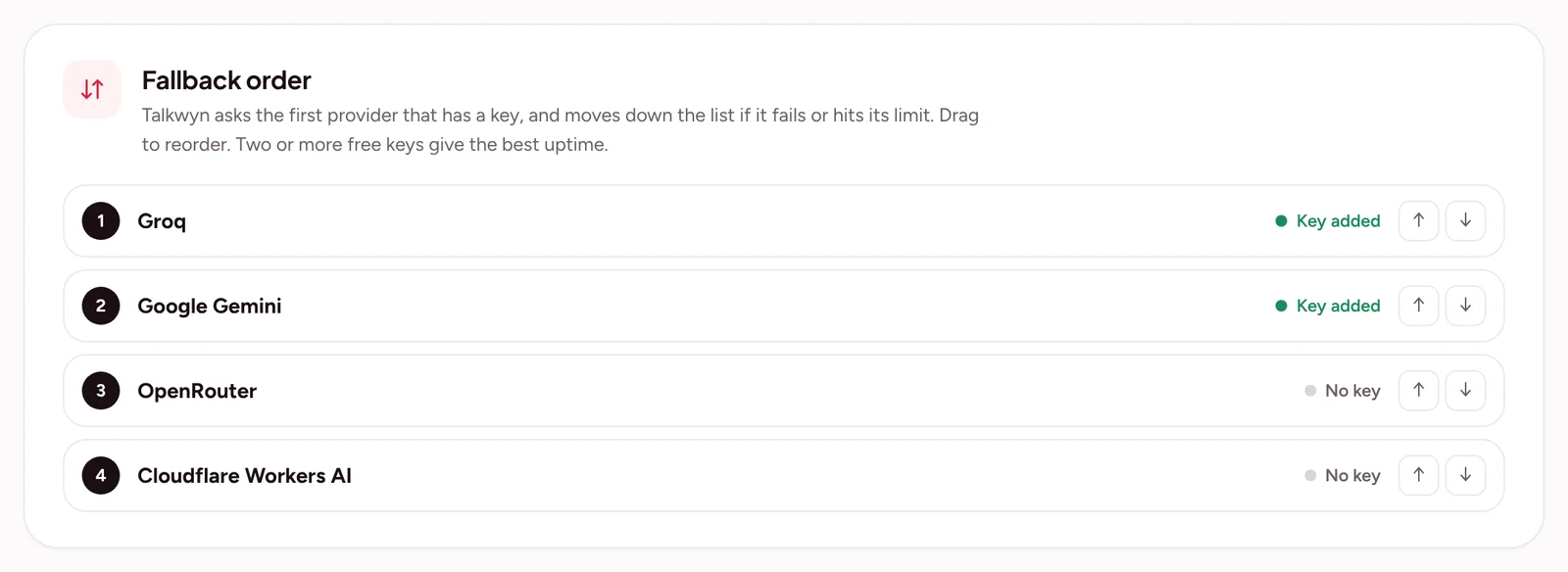
The order Talkwyn tries providers
- Greetings and small talk are handled without calling any AI, so they do not use your quota.
- For other questions, Talkwyn tries the provider at the top of your list.
- If that provider hits its limit or is busy, Talkwyn moves to the next one and remembers which one is working.
- If every provider is busy, Talkwyn still replies with the most relevant information it found on your site.
Change or remove a provider
- Open Talkwyn’s AI provider settings.
- To replace a key, paste the new key over the old one and save.
- To change the order, move the provider you want first to the top of the list.
- To remove a provider, delete it from the list and save. Then delete the key on the provider’s own site too.
Troubleshooting
- The key is rejected. Copy it again with no spaces before or after. If it still fails, create a new key on the provider’s site.
- Cloudflare does not connect. Check that you pasted both the Account ID and the token, and that the token is allowed to use Workers AI.
- Answers stop at busy times. Your free tier may have hit its limit. Add a second provider from a different company.
- Replies in one language are weak. Language quality depends on the model. Try another provider or model and test again.
- An OpenRouter model stopped working. The list of free models changes. Pick another model marked as free, or a paid one.
Paid models with Pro
Talkwyn Pro adds OpenAI, Anthropic Claude, Mistral, and DeepSeek. Paid models are a good choice for busy sites, for steady capacity in peak seasons, or for the best quality in a less common language. Language quality depends on the model you choose, so test your main languages. See Talkwyn pricing, or try Pro free for 15 days.
Privacy
Messages go only to the AI provider you picked. Talkwyn does not send them anywhere else. Your indexed content, chats, and leads stay in your own WordPress database. Only public, published content is indexed, and you can turn logs off or delete them automatically after a set number of days. Each provider has its own privacy terms, so read them before you choose.
Want more detail on each provider and on keeping keys safe? Read our free AI API keys guide. Next: finish setup with getting started with Talkwyn.
Frequently asked questions
How do I try this on my own site?
Install the free plan, or start a 15-day Pro trial, and test it with the questions your customers really ask. Install Talkwyn.
How long does setup take?
About five minutes. Install Talkwyn, paste a free AI key, click Scan my site, pick your color, avatar and welcome message, and turn it on. The setup guide walks through each step.
Is there a free plan?
Yes. The free plan is free forever, not a time-limited demo. It includes the site scan, multilingual answers, lead capture, chat history and the free AI providers. See every plan.
How does the free trial work?
You get every Pro feature for 15 days on one site. No credit card needed. When the trial ends, upgrade with the same key or keep the free plan. Start the trial.
What happens when the answer is not on my site?
Talkwyn says it could not find that and offers to have your team follow up. It answers business questions only from your own content, so it never invents a price or a policy.
Where are chats and leads stored?
In your own website database. Messages go only to the AI provider you picked, and you can turn chat logs off or have them deleted after a number of days you choose. Read our privacy approach.
Do I need to pay for AI?
Not to get started. Groq, Google Gemini, OpenRouter and Cloudflare Workers AI offer free tiers. Add more than one and Talkwyn switches automatically when one hits its limit. Pro adds OpenAI, Anthropic Claude, Mistral and DeepSeek. Choose an AI provider.
Will it slow down my site?
The chat script is small, loads after your page, and talks to your server only when someone sends a message.
Does it work outside WordPress?
Talkwyn is live today as a WordPress plugin that works with WooCommerce. A Shopify app and a one-line embed for any website are in development, and Wix, Webflow, Squarespace, HubSpot and Zapier are planned. See every integration.
Does it show where each answer came from?
Yes. Source links appear under every answer, so visitors can open the page the answer came from and read more.