Website chatbot privacy comes down to a few plain questions: what can the bot read, where do the chats go, who can see them, and how long are they kept. This checklist walks through each one so you can set up a chatbot with care, explain it to your visitors, and know what to ask your own advisor.
1. Know what the chatbot can read
A chatbot that answers from your website has to read your website first. The first privacy question is simple: which content does it read, and which content does it never touch?
- Does it read only public, published pages, or also drafts and private posts?
- Can it see user accounts, customer records, or order history?
- Does it read files you uploaded but never linked, such as PDFs in your media library?
- Can you exclude a page or a section if you need to?
Talkwyn indexes only public, published content: pages, posts, WooCommerce products, menus, custom fields, and Elementor content. It never reads drafts, users, or passwords. A good rule for any tool: if a page is not something you would show a stranger on your website, it should not be in the chatbot’s index. Read more about how Talkwyn answers from your content.
2. Keep sensitive content off public pages
The chatbot only knows what you publish. That is good news, because it gives you a simple control. Before launch, look through your public pages for anything that should not be there:
- Internal price lists or staff notes left on a forgotten page.
- Customer names, testimonials with personal details, or case notes.
- Old pages with outdated policies that you meant to unpublish.
Clinics, law firms, and schools should be extra careful here. Our chatbot for healthcare page has a short list of what a clinic chatbot should and should not do.
3. Find out where chats and leads are stored
Every chat creates data: the questions, the answers, and sometimes a name and phone number. Ask where that data lives.
- Is it stored on the vendor’s servers, or in your own database?
- Can you export it, for example as CSV?
- Can you delete a single conversation or lead when someone asks?
- What happens to the data if you stop using the tool?
With Talkwyn, chats and leads stay in your own WordPress database, and you can export leads as CSV. That keeps the data with the rest of your site data, under the backups and access rules you already use.
4. Know which AI provider sees the messages
An AI chatbot sends each question, along with the relevant parts of your pages, to an AI model to write the answer. That model runs at an AI provider. You should know which one, and read its terms.
- Which provider receives the messages?
- Can you choose the provider yourself, or is it fixed?
- Does the provider’s plan you use allow your kind of data?
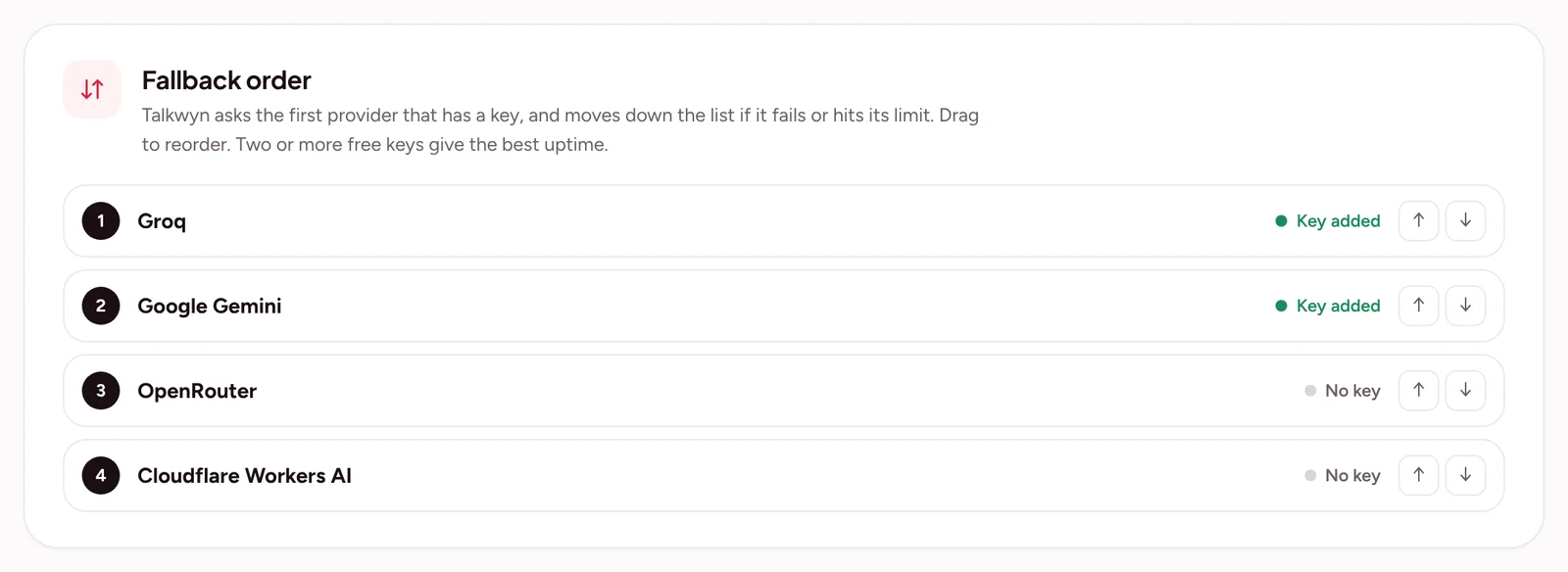
Talkwyn sends messages only to the AI provider you picked, such as Groq, Google Gemini, OpenRouter, or Cloudflare Workers AI, and on Pro, OpenAI, Anthropic Claude, Mistral, or DeepSeek. Because you choose, you can read that provider’s terms and decide. Our guide to choosing an AI provider explains the options.
5. Set how long logs are kept
Chat logs are useful. They show what visitors ask and where your pages fall short. They are also data you have to look after. Decide how long you really need them.
- Turn logs off completely if you do not need them.
- Or set them to delete automatically after a number of days you choose.
- Keep leads separately if your team needs them for follow-up.
Talkwyn supports both: logs can be turned off, or deleted automatically after a set number of days. A shorter period means less data to protect.
6. Ask for only what you need
A lead form inside a chat should be short. Most businesses only need a name and one way to reach the person. Every extra field is more data to store and more reason for a visitor to stop.
- Ask for a name and a phone number or email, not both unless you need both.
- Never ask for passwords, card numbers, or ID numbers in a chat.
- In health, legal, or financial settings, ask visitors not to share details of their case in the chat.
Talkwyn asks before it shows the form, so visitors choose whether to share their details. See how that works on the lead generation chatbot page, and our tips for capturing leads without being pushy.
7. Tell visitors what happens
People are more comfortable when they know what is going on. Be open about it:
- Show a short privacy notice in the chat window, with a link to your privacy policy.
- Mention the chatbot, the AI provider, and how long you keep chats in your privacy policy.
- Make it clear the visitor is talking to an AI assistant, not a person.
Talkwyn includes a built-in privacy notice you can show in the chat. Write the wording with your own advisor so it matches your policy.
8. Control where the chatbot appears
Not every page needs a chatbot. On some pages it can get in the way, or invite people to share things they should not.
- Hide it on checkout and thank-you pages so it does not distract during payment.
- Hide it on patient forms, application forms, or pages about sensitive topics.
- Keep it on pages where questions are practical: services, prices, hours, shipping.
Talkwyn lets you hide the chatbot on checkout, thank-you, or any page you choose. It also has rate limiting built in, which helps stop abuse of the chat.
A one-page checklist
- The chatbot reads only public, published content.
- No sensitive content sits on public pages.
- You know where chats and leads are stored, and you can export and delete them.
- You know which AI provider receives messages, and you read its terms.
- Logs are off, or set to delete after a period you chose.
- The lead form asks only for what you need.
- Visitors see a privacy notice and know they are talking to an AI.
- The chatbot is hidden on checkout and sensitive pages.
Run through this list before launch, then again whenever you change your site or your provider. Our chatbot test plan covers the rest of the launch checks, and the Talkwyn privacy page explains how we handle data on talkwyn.com.
Website chatbot privacy FAQ
Does Talkwyn read my customers’ accounts or orders?
No. It indexes only public, published content. It never reads drafts, users, or passwords.
Where are chats stored?
In your own WordPress database. Messages go only to the AI provider you picked to write the answer.
Can I stop keeping chat logs?
Yes. You can turn logs off, or have them deleted automatically after a number of days you choose.
Is Talkwyn certified for healthcare or legal data?
No. Talkwyn does not claim any compliance certification. Check with your own advisor whether a website chatbot fits the rules that apply to you.
Can I hide the chatbot on some pages?
Yes. You can hide it on checkout, thank-you, or any page you choose.
How long does setup take?
About five minutes. Install Talkwyn, paste a free AI key, click Scan my site, pick your color, avatar and welcome message, and turn it on. The setup guide walks through each step.
Is there a free plan?
Yes. The free plan is free forever, not a time-limited demo. It includes the site scan, multilingual answers, lead capture, chat history and the free AI providers. See every plan.
How does the free trial work?
You get every Pro feature for 15 days on one site. No credit card needed. When the trial ends, upgrade with the same key or keep the free plan. Start the trial.
What happens when the answer is not on my site?
Talkwyn says it could not find that and offers to have your team follow up. It answers business questions only from your own content, so it never invents a price or a policy.
Do I need to pay for AI?
Not to get started. Groq, Google Gemini, OpenRouter and Cloudflare Workers AI offer free tiers. Add more than one and Talkwyn switches automatically when one hits its limit. Pro adds OpenAI, Anthropic Claude, Mistral and DeepSeek. Choose an AI provider.